Document sections
This document deals with the creation and editing of Voyager item records for monographs.
For serial item records, see:
For monographs, see also:
Item records should be created at the time of cataloguing.
(Exception: Blackwell book plan records came with linked item records already created.)
Basic procedures for creating a new item record:
- The associated bib or holdings record must be open.
- Either
- Use the keyboard sequence:
- Alt-R
- T
- or
- Click on the "New Items" icon towards the top -- the stack of books with a plus
sign, fourth from the right

- or
- Open the Record menu and click on the "Create Items" option
- Enter the barcode number, if needed. Please note that item records
should be created even for items that do not get barcodes.
- Make sure that the item type is set correctly.
- Enter any enumeration information needed.
- Make sure that the item status is set correctly.
- Make sure that the copy number is correct.
- Save the record to the database.
Return to top of this document
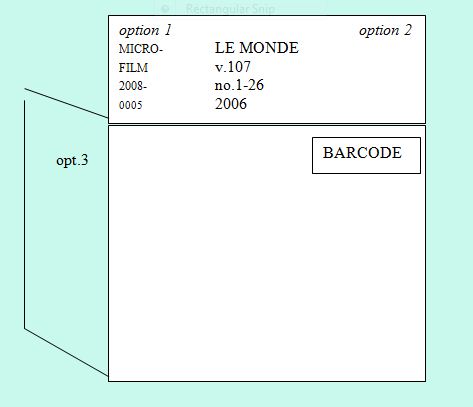
Put barcode in piece and barcode number in item record when appropriate for the location.
The placement and type of barcode may also depend on whether an item is to be bound or sent for repair.
For more information on when to barcode, consult the table in "
Treatment of Items and Information in Voyager Item Records, by Location."
For more information on when to bind -- and thus what type of barcode to use -- consult "
To Bind or Not To Bind!! Binding Policy for Non-Serial Items."
- Barcode labels:
- Barcode field in item record
- Wanding in the barcode number is the safer way to enter them. They can be keyed in when necessary.
Tip: If you work with a sheet or rolled section of barcodes that you use sequentially,
a Macro Express macro can be set up to provide most of the digits in the barcode number. For example,
you could enter the macro and just key in the final 3 digits.
This macro only needs to be updated each time that you begin a new sheet or roll.
- The barcode field has a box at the right with ellipses (dots). You can click on this box to:
- Add a barcode number to an item record created without one.
- Add a second barcode number when necessary. For example, if a returned In-Process-request
book needs to be bound, a second number is needed for the second barcode. (The first barcode
number should be left in the item record.)
- Check a second barcode number (when one is active and the other inactive).
- Once a barcode number has been stored in an item record, that record
can be retrieved by the barcode number. Either:
- Use the macro key combination Shift-F7
- or
- Use the keyboard sequence:
- Alt-R
- B
- or
- Open the Record menu and click on "Retrieve by barcode."
Return to top of this document
The permanent location ("Perm. Loc.") represents the basic location of the item. When the item
record is created, this location is pulled automatically from the holdings record.
A drop-down box is available to help you select the correct location.
Changing location: Once the item record has been created, if the location code is
changed or corrected, it needs to be edited in both the holdings record and the item
record.
If you change the permanent location, the item type may also need to be changed.
Return to top of this document
The default item type in most Cataloging Dept. templates is Book.
- Type of material: If you catalog something other than a book or if you create an item record for accompanying nonbook material,
you will need to change the item type:
- Location: Some locations get special item types.
To verify the specific item type for your location, please consult the table in "Treatment of Items and Information in Voyager Item Records, by Location."
Please note:
- All Reference locations get an item type of Ref.
- All Rare books -- including all SEAA books -- get an item type of Rare.
- Books for the Architecture Library and the Math Library get their own item types, which begin with "AR..." and "MA ..." respectively.
Return to top of this document
Fill in for multivolume monographs.
Return to top of this document
The item status At Bindery should be included in records for items going to the Preservation Dept.
to be bound or repaired. (For more information on whether to send something to be bound, please see
"To Bind or Not to Bind!! Binding Policy for Non-Serial Items.")
If most of the books that you catalogue will not need to be bound, it is probably easier not to set the
At Bindery status as a default.
- Setting the "At Bindery" status message when it is not the default:
- Open the item record.
- Open the
Item status box: Either:
- Use the keyboard sequence Alt-I [Enter]
- or
- Click on the "graph" icon in the lower left-hand corner:

- The "At Bindery" status should be highlighted.
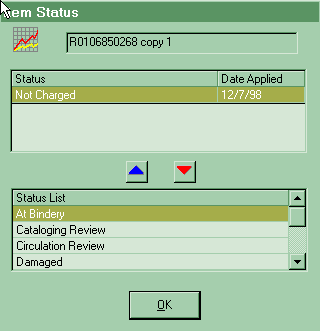
- Either:
- Click the blue Up arrow in the center of the box.
or
- Double-click on "At Bindery."
- The "At Bindery" message should move up to the "Status" section in the upper part of the box.
- Hit Enter or click "OK" to store the new status message.
- Deleting the "At Bindery" status message:
- Open the item record.
- Open the
Item status box: Either:
- Use the keyboard sequence Alt-I [Enter]
- or
- Click on the "graph" icon in the lower left-hand corner:
- Either:
- Highlight "At Bindery" in the "Status" section in the upper part of this box:
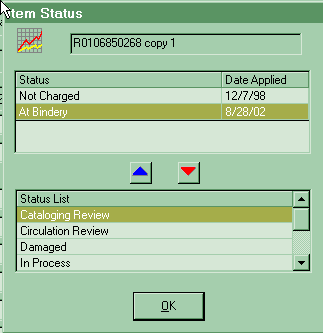
- then
- Click the red Down arrow in the center of the box.
or
- Double-click on "At Bindery."
- The "At Bindery" message should move down, out of the "Status" section to the "Status list"
towards the bottom of the box.
- Hit Enter or click "OK" to store the change.
- Setting "At Bindery" as an item record default: If you will be sending a number of items to be bound, setting
"At Bindery" as an item record default for that group of items -- so that every item record that you
create will automatically get this status -- may save you some time. To do so:
Return to top of this document
- Item records created locally: The default copy number (usually "1" for new title cataloguing) can be added to the
Item defaults screen. (The procedure is the same as for setting the "At Bindery"
status as an item record default, in the box labeled "Copy.")
If the copy number is not 1, you will need to change either the number in the item record or, if you are doing many copy 2's, etc., the item default.
- Item records created by Blackwell: Accept copy number "0" (zero).
Return to top of this document
To retrieve an item record that has already been created:
- From associated holdings or bib record: Either:
- Use the macro: F7
- or
- Use the keyboard sequence:
- Alt-R
- M
- or
- Click on the "Get Items" icon towards the top -- the stack of books (without plus
sign), third from the right

- or
- Open the Record menu and click on the "Retrieve Items" option
- Using barcode number
- Using item record number:
Either:
- Use the keyboard sequence:
- Alt-R
- I
- I
- or
- Open the Record menu and click on "Retrieve by record id"; then click on "Item ..."
Return to top of this document
- Call up the list of item records.
- Select line of item record to be moved.
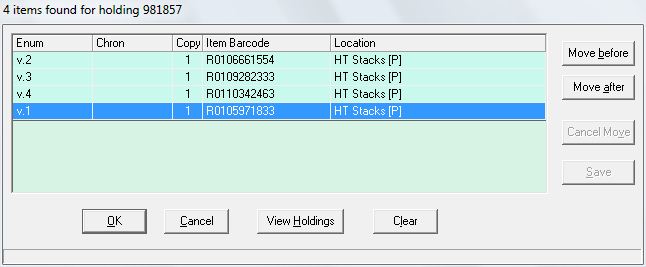
- Either:
- Click "Move before"
- then
- Scroll to place where want; click on line just after it.
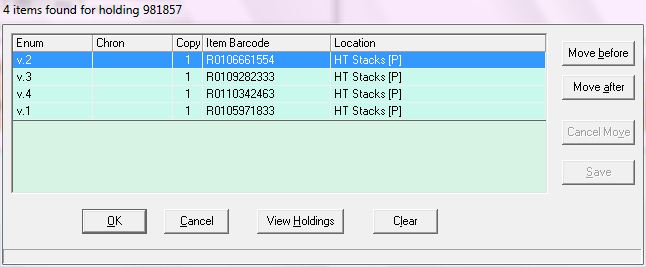
- or
- Click "Move after"
- then
- Scroll to place where want; click on line just before it.
- Item record line should move to the appropriate place; message "Move completed" should
display in the lower left-hand corner of the box.
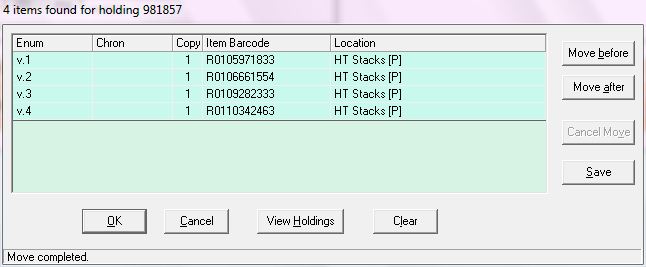
- Key Alt-O or Click "OK" to confirm.
Return to top of this document
- Write down the holdings record ID number of the record to which the item record should
be linked. It can be a holdings record either for the same bib record or for a different one.
- Call up the item record to be relinked.
- Key Alt-R, H or click on Record, "Relink to a different holding ..."
- A box should display, prompting you for a holdings record number:
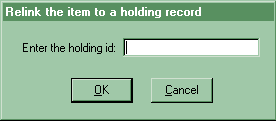
- Enter the holdings record ID number of the new holdings record.
(If you change your mind, you can key Alt-C or click on "Cancel" button.)
- A new box should appear, with the message "Item successfully relinked."
- Hit Enter or click on "OK" to confirm.
- Before closing item record: Double-check title, location, permanent location, and
call number, to make sure that the item record has been linked to the correct holdings record.
Return to:
Revised as of 3 December 2010
HTML document last reviewed: 6 December 2010