Voyager Templates
Document sections
Introduction
A Voyager template is a file that supplies data in a Voyager bibliographic, holdings, or authority record, as appropriate. When it is set in your Voyager preferences, it automatically provides information that is always or very frequently the same in a particular category of your work, such as creating provisional bib records or creating MARC holdings records for single-volume monographs going to the regular Howard-Tilton stacks. To have a customized template serves as a tool to make your workflow more streamlined and less time-consuming.
(Please note: Templates are applied at the time of record creation; they cannot be incorporated into records that already exist.)
Several templates are already available in your Voyager client. It is also possible to create new templates.
Selecting
an Existing Template
In the Voyager application:
- To create the path to a template (Bib or Holdings):
- Click on: Options
 Preferences Folders/Files click in the Template
box for the desired template.
Preferences Folders/Files click in the Template
box for the desired template.
or
- Use the keyboard
sequence:
Alt-O
[letter “oh”], Enter, Alt-F
Tab to the desired type of template.
2.
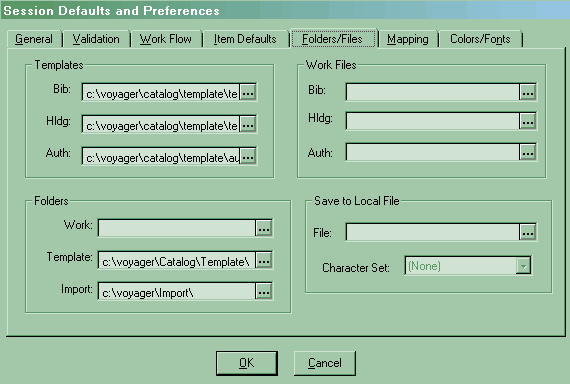
3. To look at the template options, click on the triple dots towards the right.
- The templates are located under:
c:\voyager\catalog\template
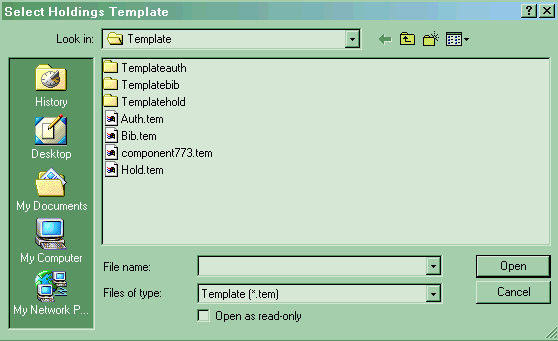
There are generic templates under the following paths:
- Bib record
template: c:\voyager\catalog\template\bib.tem
- Holdings record template:
c:\voyager\catalog\template\hold.tem
- Authority record
template: c:\voyager\catalog\template\auth.tem
Usually, though, you will use specific templates that have been customized for our Cataloging Department. They are located within the folders:
- Templatebib
(c:\voyager\catalog\template\templatebib\)
For example, the file for the bibliographic record provisional template is normally
prov.tem
- Templatehold
(c:\voyager\catalog\template\Holdings)
For example, the commonly used template files for:
- Single-volume stacks
copy that is in process:
singlestx.tem
- Single-volume LAL copy
that is in process:
singlelal.tem
- Single-volume stacks
copy that has been catalogued by the time of the MARC holdings record
creation:
single.tem
- Multi-volume stacks
copy that is in process:
multistx.tem
- Multi-volume LAL copy
that is in process:
multilal.tem
- Multi-volume stacks
copy that has been catalogued by the time of the MARC holdings record
creation:
multi.tem
- Serial stacks copy
that is in process:
serialstx.tem
- Serial LAL copy that
is in process:
seriallal.tem
- Serial stacks copy
that has been catalogued by the time of the MARC holdings record
creation:
serial.tem
- Templateauth
(empty folder for most people)
- Once you have located the appropriate template
file: Double-click on it to select it (or click on it and click on Open).
That file, including its complete path, should appear in the appropriate section of the Templates box under Voyager Files/Folders preferences.
Return
to top of document
Creating
a New Template
If none of the existing templates is suitable for the work that you are doing, you can create a new one. You have control over what needs to be on each template you create.
You must have at least one template for each type of record you want to create (e.g., prov.tem, singlestx.tem, auth.tem). To create a template:
- From the File menu, select Template, New
or
Use the keyboard sequence:
Alt-F,
T, Enter
- Select the record type (Authority, Bibliographic, or
Holdings) and click OK
or
Use the Down arrow cursor and hit Enter when you reach your choice.
The system template for the record type you selected should be displayed.
- Create the template by completing the leader, fixed
fields, and variable fields for those values that will tend to be constant
when you apply this template. For more information on these fields
(Bibliographic, Holdings, or Authority), see our local
Voyager Cataloging documentation.
Specifically, you can go to the links below to get to the documentation:
|
Bib
record
|
||
|
Holdings
record
|
||
|
Authority
record |
- Save your template file:
- From the File
menu, select Save As...
or
Use the keyboard equivalent:
Control-A
- Make sure that the path
is correct, i.e., that you are saving your template file under the
correct folder (e.g., Templatebib, Templatehold, or Templateauth).
- Type the name you want
for your template.
Please note: The naming convention should be a unique name. The suffix for the file must be .tem.
- Click on the Save
button (or key in Alt-S).
When a template is saved, it is not validated against the MARC tag table or authority records.
Return to:
draft 23 November 2002
HTML document last reviewed: 27 November 2002